Write a short note on :(a) Keyboard (b) Mouse (c) Joystick (d) Trackball (e) Digitizer (f)Lightpen (g) Touch panels (h) Scanner (i) Printer
a) Keyboard:- The keyboard is the most common and widely used input device. It is made up of buttons
called 'keys'. The keys are arranged into sections:
- Alphabet keys
- Function or F keys (F1, F2, F3)
- Numeric keys (one set above the alphabet keys and a numeric keypad on the right)
- Arrow keys
- Command keys (insert, delete, home, end, page up/down)
Keyboards are used to input Text, numbers and instructions into the computer. Most keyboards use a QWERTY key layout. This name comes from the first six letters on the top row of the alphabet keys.
b) Mouse:- Mouse is a device that controls the movement of the cursor or pointer on a display screen. It is a small object you can roll along a hard and flat surface. As you move the mouse, the pointer on the display screen moves in the same direction. The mouse contains at least one button and sometimes as many as three, which have different functions depending on what program is running. The mouse is a small device used to point to a particular place on the screen and select in order to perform one or more actions. It can be used to select menu commands, size windows, start programs etc.
c) Joystick:- A joystick is used as a personal computer peripheral or general control device consisting of a hand-held stick that pivots about the base and steers the screen cursor around. Most joysticks are two-dimensional, having two axes of movement (similar to a mouse), but three-dimensional joysticks do exist. A joystick is generally configured so that moving the stick left or right signals movement along the X-axis, and moving it forward (up) or back (down)signals movement along the Y-axis. In joysticks that are configured for three-dimensional movement, twisting the stick left (counter-clockwise) or right (clockwise) signals movement along the Z-axis. In conventional joystick potentiometers or variable resistors, are used to dynamically detect the location of the stick and springs are there to return the stick to the center position as it is released.
d) Trackball:- It is a pointing device. It is similar to a mouse. This is mainly used in a notebook or laptop computer, instead of a mouse. This is a ball that is half inserted, and by changing fingers on the ball, the pointer can be moved.
e) Digitizer:- The digitizer is an operator input device, which contains a large, smooth board (the appearance is similar to the mechanical drawing board) & an electronic tracking device, which can be changed over the surface to follow existing lines. The electronic tracking device contains a switch for the user to record the desired x & y coordinate positions. The coordinates can be entered into the computer memory or stored or an off-line storage medium such as magnetic tape.
f) Lightpen:- Light Pen (similar to the pen) is a pointing device that is used to select a displayed menu item or draw pictures on the monitor screen. It consists of a photocell and an optical system placed in a small tube. When its tip is moved over the monitor screen, and the pen button is pressed, its photocell sensing element detects the screen location and sends the corresponding signals to the CPU.
g) Touch panels:- Touch Panels are a type of display screen that has a touch-sensitive transparent panel covering the screen. A touch screen registers input when a finger or other object comes in contact with the screen. When the wave signals are interrupted by some contact with the screen, that location is recorded. Touch screens have long been used in military applications.
h) Scanner:- It is an input device. The data or text is written on paper. The paper is fed to the scanner. The paper-written information is converted into electronic format; this format is stored in the computer. The input documents can contain text, handwritten material, and picture extra.
By storing the document in a computer document became safe for a longer period of time. The document will be permanently stored in the future. We can change the document when we need. The document can be printed when needed.
Scanning can be of the black and white or colored picture. On stored pictures 2D or 3D rotations, scaling and other operations can be applied.
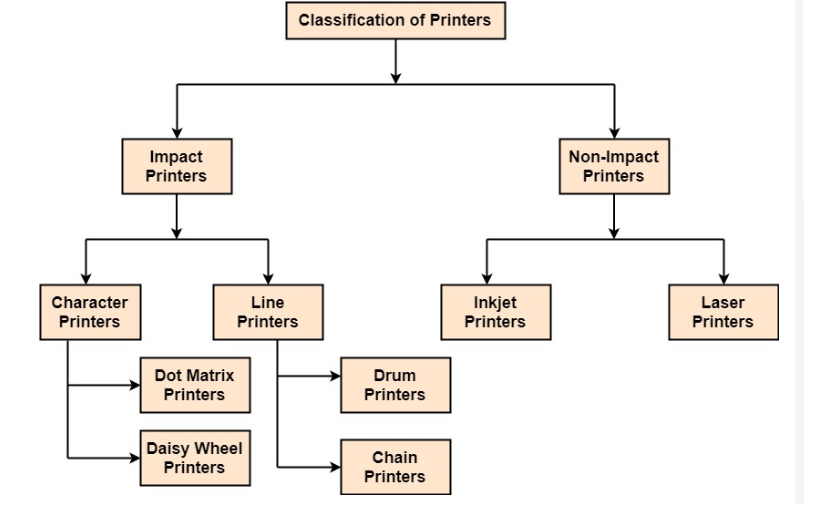
i) Printer:- Printer is the most important output device, which is used to print data on paper. Types of Printers: There are many types of printers which are classified on various criteria as shown in fig: